Several updates have been made to sales orders in BBS, designed to improve the accuracy and efficiency of your sales order processing.
Key Changes:
We have added new fields for Delivery Phone and Delivery Email to sales orders.
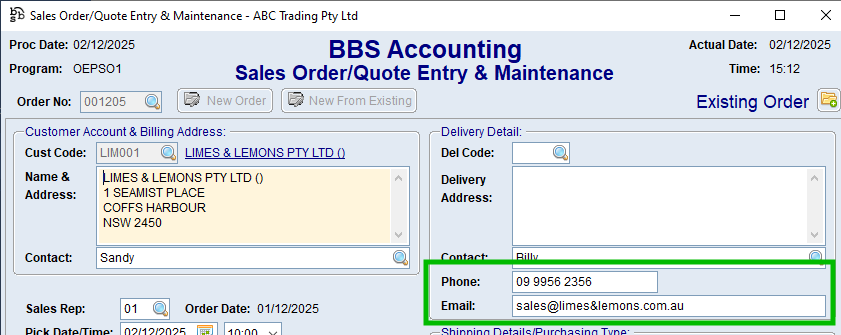
These fields will be populated automatically based on the following scenarios:
•For manual orders:
•If no delivery address is selected, the Sales Phone and Sales Email from the customer will be used.
•If a delivery address is specified, the phone number and email address from that delivery address will be used if one has been specified, if blank, the Sales Phone and Sales Email from the customer will be used.
•For Web/EDI orders:
•The Delivery Phone and Delivery Email will transfer from the Web/EDI order unless the delivery address has its own phone and/or email. In that case, the delivery address details will take precedence.
Screens Affected:
The following screens have been updated to include these new fields:
•Sales Order/Quote Entry & Maintenance
•BTS Booklist Maintenance – Delivery Details screen
•Recurring Sales Order Maintenance – Header Information Tab
Modules Using the New Fields:
Several modules have been updated to prioritise the Delivery Phone and Delivery Email from the sales order first. If these fields are blank, the system will fall back to the previous methods (e.g. from linked web orders or the customer).
•Documents that print the delivery phone number, such as picking slips, delivery dockets, etc.
•Adding sales orders, delivery dockets, or invoices to manual manifests
•Booking consignments with integrated couriers (e.g. Australia Post, Aramex)
•Placing direct delivery purchase orders
•Sending credit hold notifications to customers
•Sending backorder notifications from the sales order management dashboard
•Back to School online order reports
Update Process:
A process has been run to populate the Delivery Phone and Delivery Email fields on all outstanding sales orders with data from linked Web/EDI orders where possible.
Sales Order/Quote Enquiry Screen